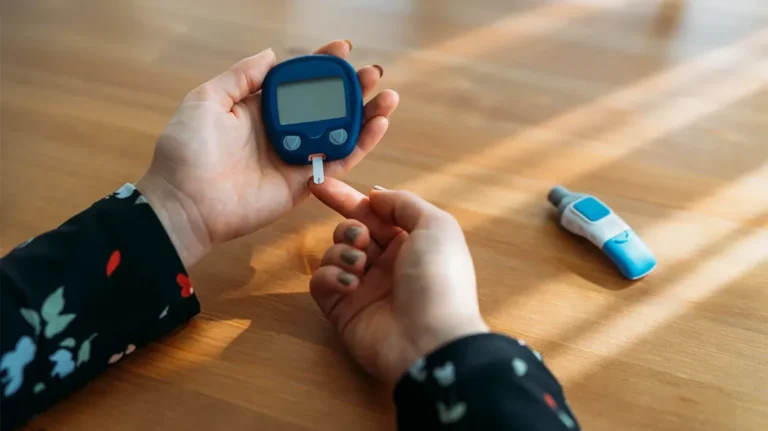
Keeping an eye on your blood glucose is essential if you have diabetes, prediabetes or gestational diabetes during pregnancy. The good news is that your phone can make this much easier.
Today, there are apps that connect to glucose meters and sensors, record your readings automatically and show charts that help you and your doctor understand your levels over time.
In this guide, you’ll discover the best apps to help you track your glucose, how they work and how to download them on iPhone and Android.
Can Your Phone Measure Glucose by Itself?
No. This is the most important thing to know before downloading any app. A phone, smartwatch or ring cannot measure blood glucose on its own. The U.S. Food and Drug Administration (FDA) has even warned people not to trust devices or apps that claim to measure glucose without piercing the skin.
The reliable apps work in one of two ways:
- With a glucose meter (glucometer): you check your blood with a finger prick, and the app receives or records the result.
- With a continuous glucose monitor (CGM): a small sensor worn on the skin measures your glucose all day and sends the readings to the app.
The apps then organize your data, show trends and send alerts, making it easier to manage your health.
The Best Apps to Track Your Glucose
1. mySugr: Diabetes Logbook
mySugr, part of the Roche group, is one of the most popular diabetes logbook apps. You can record glucose readings, meals, carbs, insulin and medication, and see easy-to-read charts and estimates of your average glucose.
It can connect to compatible Accu-Chek meters to log your readings automatically, and you can also enter data manually.
2. Glucose Buddy: Diabetes Tracker
Glucose Buddy is a simple tracker for people who want to log their glucose, meals, medication and physical activity in one place. It shows charts and reports that help you spot patterns over days and weeks.
It’s a good option if you measure with a regular meter and want an easy way to keep your daily log organized.
3. OneTouch Reveal: For OneTouch Meters
If you use a OneTouch glucose meter, the official OneTouch Reveal app from LifeScan connects to compatible meters via Bluetooth and records your results automatically.
The app highlights high and low patterns and makes it easy to share reports with your doctor.
4. Dexcom G7: Continuous Glucose Monitoring
The Dexcom G7 app works with the Dexcom G7 sensor, a continuous glucose monitor that sends readings to your phone throughout the day, with no routine finger pricks needed.
You can see your glucose in real time, follow trend arrows and set alerts for high and low levels. The sensor usually requires a prescription.
5. FreeStyle Libre 3: Abbott’s CGM App
The FreeStyle Libre 3 app from Abbott connects to the FreeStyle Libre 3 sensor, another popular continuous glucose monitor. It shows your current glucose, trends and history directly on your phone.
It also offers optional alarms for high and low glucose and lets you share data with your care team. Like other CGMs, the sensor usually requires a prescription.
Glucose Tracking During Pregnancy
Gestational diabetes is a type of diabetes that can develop during pregnancy. Most women are screened for it between 24 and 28 weeks, and if it’s diagnosed, the doctor may ask you to check your glucose several times a day.
In this case, a logbook app like mySugr or Glucose Buddy can help you:
- Record each reading with the time and whether it was before or after a meal.
- Note what you ate, so you can see which foods raise your glucose.
- Share reports with your doctor or dietitian before each appointment.
Always follow the targets and schedule recommended by your healthcare team.
How to Choose the Right App
- Check your device: if you already have a meter or sensor, start with the official app from its brand.
- Look for easy sharing: reports that you can send to your doctor save time at appointments.
- Consider alerts: CGM apps can warn you about highs and lows, which is very helpful for some people.
- Read the privacy section: health data is sensitive, so check how the app stores and uses your information.
- Avoid miracle apps: skip any app that promises to measure glucose using only your camera, fingerprint or phone screen.
Frequently Asked Questions
Are glucose tracking apps free?
Most of them are free to download. Some offer premium features through subscriptions, and CGM apps require the sensor, which is sold separately and often covered by insurance.
Do I need a prescription to use these apps?
Logbook apps like mySugr and Glucose Buddy don’t require a prescription. Continuous glucose monitors such as Dexcom G7 and FreeStyle Libre 3 usually do.
Can an app replace my doctor?
No. Apps help you organize your information, but diagnosis, treatment and target levels should always be defined by a healthcare professional.
Final Thoughts
Glucose tracking apps can make your daily routine much easier, whether you use a traditional meter or a continuous sensor. Apps like mySugr, Glucose Buddy, OneTouch Reveal, Dexcom G7 and FreeStyle Libre 3 help you record your readings, understand your patterns and share everything with your doctor.
Choose the one that fits your device and your routine, and remember: your healthcare team is your best guide.
This article is for informational purposes only and does not replace professional medical advice. Always talk to your doctor about how and when to check your glucose.